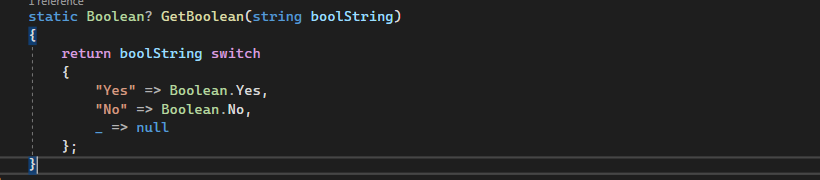
Gotchas with switch expression
This post talks about a bug in Rider and Roslyn analyzers when we refactor the switch-case to switch expression with Nullable default type.
This post talks about a bug in Rider and Roslyn analyzers when we refactor the switch-case to switch expression with Nullable default type.
The post describes JetBrains Rider as an alternate to Visual Studio and how Rider can help mitigate some of the Visual Studio pain-points.
Different approaches we considered to set up integration tests when running against multiple DB providers in ASP.NET Core
In my previous post, I had talked about how we to ported an existing repository code from Azure SQL to Amazon Aurora. This is a two-series post where I will throw a little bit more light on the intention behind it and what we were trying to achieve. Background We had a small ASP.NET Core solution
Visual Studio is my bread and butter. It has played an important role in shaping my career. In the same breath, ReSharper has helped a lot to improve my productivity and make me a better programmer. And I’m sure there are many others like me who use Visual Studio and ReSharper on a daily basis.
Disclaimer: This post is not an endorsement or opposition of any product or tool. Opinions present here is based on our experiences. Please exercise your own independent skill and judgement before you rely on the information in this post. 🙂 This is Part-3 and final part of my blog series on Static Analysis Software Testing
Disclaimer: This post is not an endorsement or opposition of any product or tool. Opinions present here is based on our experiences. Please exercise your own independent skill and judgement before you rely on the information in this post. 🙂 This is Part-2 of my blog series on Static Analysis Software Testing (SAST) tooling. In
This post is Part-1 of multi-part series describing our journey to ditch popular Static Application Security Testing (SAST) tool Veracode and our quest for a better security tool. Background Until recently, our organization used Veracode for security analysis for few our applications. Veracode came with a lot of reputation. It is considered a leader in
I’m quite an unorganized person. I spend most of my time in front of a computer in my office or in meetings. At home, I’m usually busy with my 2-year old or household chores. As a result, my list of ToDo items keeps on growing. And when I do find some time to work on
It is a fairly common scenario that during development the local machine configuration settings for different developers in are not same and it may not match with the default value in source control. One such example can be SQL server connection string. Some developers may have SQL Express installed, others may have a named instance
Tools and tricks you can use along with Visual Studio to make your life easy as a developer:
Warning: The content of this post is highly opinionated. Please exercise caution. 🙂 A bit of Background Back in 2012-13, the term Dev-Ops was unheard of in my team. We were still living in dark ages where a developer would developed the code, then write unit test cases more to get the code coverage look good
When you open VS, the first thing that you notice is the Start Page. In VS 2015 the Start Page provided a useful way to open recent projects, look into tech news. But this is where it stopped. VS 2017 has totally revamped the Start Page experience. It is visually more appealing and offers more options
Visual Studio 2017 was launched with much fan fare yesterday (March 7, 2017). I started exploring Visual Studio 2017 from RC and I must say, after using VS 2017 I felt I was earlier leaving in stone age. It is so much better. In short the Visual Studio 2017 is equivalent to following: VS 2017
Today, every project we work on big or small, easy or complex, small team or large team is probably on Source Control. The source control of course can be git, VSTS, SVN etc. Still, there are times where you need to share your code as zip in an email, or shared link. It could be because
Recently, I came across this blog post from ASP.NET Monsters which talks about correct using HttpClient. The post talks about issues of related to disposing HttpClient object for each request. As per the post calling HttpClient as below can lead to issues.
In my current engagement, we have more than 80 projects in a solution (don’t ask me why :)). Recently, as per quality guidelines, we needed to make few changes to each project. For example: Treat warnings as errors, enable code analysis for each project, sign assembly etc.
Recently, I worked on a ASP.NET 4.6 MVC 5 project which didn’t have anything MVC about it. 🙂 It was a Single Page Application built on TypeScript, Knockout JS, CSS. Now, since it we didn’t have any server side code, we decided to give Gulp a try to concatenate and minify the JS and CSS
This post is Part 2 of the series – Publish web app to Azure VM. In this post I will take the application, we created in Part 1 and publish it on Azure Virtual Machine through Visual Studio Team Services.
Publish Web App to Azure Virtual Machine Part 1