I recently migrated the Dotnet Foundation website, https://dotnetfoundation.org/ to ASP.NET Core 3.0. The site was initially built on ASP.NET Core 2.1 and I found this as a good learning opportunity.
Migrating from ASP.NET Core 2.1 to 2.2
I had initially raised PR to migrate from ASP.NET Core 2.1 to 2.2 instead of directly going to ASP.NET 3.0. The reason I chose to not migrate to ASP.NET Core 3.0 directly was that dotnetfondation.org is hosted on Azure App service and at the time of writing ASP.NET Core 3.0 is not available for Azure App Service. As per the documentation:
ASP.NET Core 3.0 not currently available for Azure App Service
We hope to make this available soon. Until ASP.NET Core 3.0 is available on Azure App Service, follow the instructions at Deploy ASP.NET Core preview release to Azure App Service.
Migrating to ASP.NET Core 2.1 did not turn out to be too tricky and Microsoft documentation helped to seamlessly migrate to ASP.NET Core 2.2.
Here are the PR and diff of my initial attempt at migration. However, @jongalloway suggested to migrate to ASP.NET Core 3.0 directly and he would do then do a self-contained deployment. So, I decided to migrate the application to ASP.NET Core 3.0 as per his suggestion.
Migrating from ASP.NET Core 2.2 to 3.0
Migrating from ASP.NET Core 2.2 to 3.0 required slightly more work since ASP.NET Core 3.0 is a major release. But again, the Microsoft documentation came to the rescue. Here is my PR for migration to ASP.NET Core 3.0.
Below are the list of the changes I went through to complete the migration. Note that the diff you see here is from my commit to upgrading to ASP.NET Core 2.2 to 3.0:
Pre-requisite: Upgrade to Visual Studio 2019 to version 16.3 or greater
As a first step, I downloaded .NET Core 3.0 SDK from here. I also had to update Visual Studio 2019 to the latest version as .NET Core 3.0 needs version 16.3 or greater.
Upgrade to netcoreapp3.0
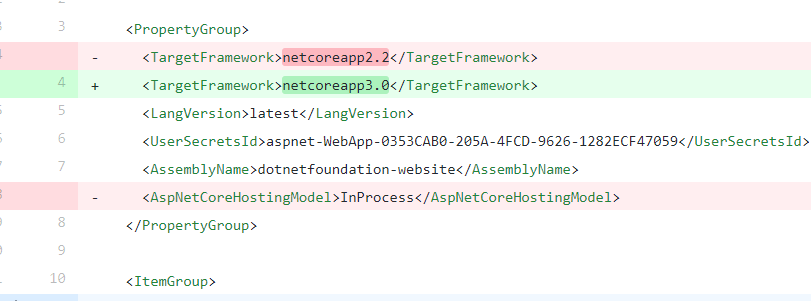
Once I was on the latest version of Visual Studio, I started with the most obvious change. That is, updating the TargetFramework in the csproj file to netcoreapp3.0. In addition to this, I removed AspNetCoreHostingModel element which was added during ASP.NET Core 2.2 upgrade. This element can be removed because projects default to in-process hosting model in ASP.NET Core 3.0. From the documentation:
Projects default to the in-process hosting model in ASP.NET Core 3.0 or later. You may optionally remove the
<AspNetCoreHostingModel>property in the project file if its value isInProcess.
Upgrade all the NuGet packages to the latest version and remove obsolete packages
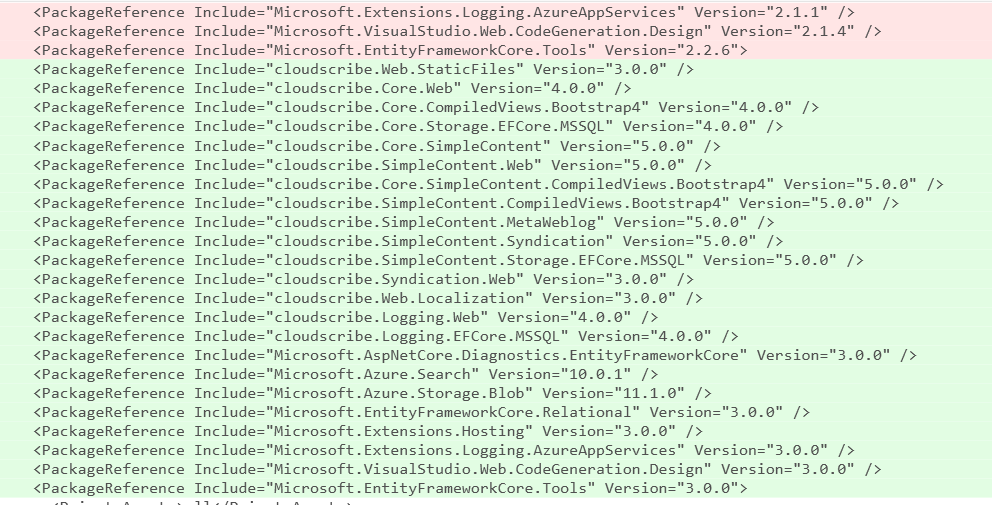
Updating the Targetframework led to several build errors. I then upgraded all NuGet packages to the latest version and removed obsolete packages such as Microsoft.AspNetCore.App.
Note that realistically I needed to only update the packages which were impacted due to .NET Core 3.0 upgrade. But instead of worrying about what to upgrade, I decided to upgrade all the packages. I found upgrading all packages to be less daunting even if it meant that there could be more breaking changes.
Replace IHostingEnvironment to IWebHostEnvironment and add Microsoft.Extensions.Hosting
With .NET Core 3.0. IHostingEnvironment has been deprecated in favor of IWebHostEnviroment. Also, extension methods such as IHostEnvironment, IsDevelopment etc now available in Microsoft.Extensions.Hosting. See this GitHub announcement for additional information.
Hence next, I replaced IHostingEnvironent with IWebHostEnvironment and added a reference to Microsoft.Extensions.Hosting wherever applicable.

Update to Routing and MVC controllers
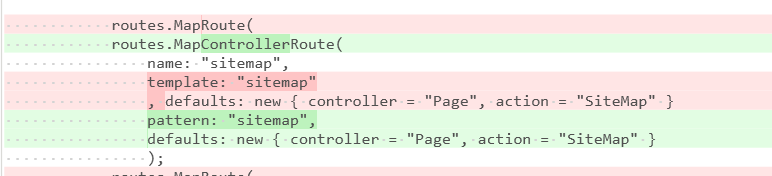
Next, I made the following changes with respect to routing.
- Introduced
app.UseRoutinginStartup.cs. This is required to be added in afterUseStaticFiles. See: Migrate Startup.Configure for details - Replaced
UseMvcwithUseEndpoints. Mapping of controllers andRazorPagesnow takes place insideUseEndpoint. - Replaced
MapRoutewithMapControllerRouteinsideUseEndpoint. See: MVC controllers - Introduced
endpoint.MapRazorPagesinsideUseEndpoint. See MVC service registration

Remove SetCompatibilityVersion
With .NET Core 3.0, SetCompatiblityVersion is no longer required. According to documentation:
The SetCompatibilityVersion method is a no-op for ASP.NET Core 3.0 apps. That is, calling
SetCompatibilityVersionwith any value of CompatibilityVersion has no impact on the application.
Hence, the method call was removed.

Conclusion
The migration exercise of ASP.NET Core 2.2 to 3.0 was not too much work. The Microsoft documentation is quite comprehensive and provides all the information you would need to migrate your app to the latest and the greatest. I now cannot wait to migrate our enterprise applications to .NET Core 3.0.
Feature Photo by Amber Walker on Unsplash
 Hi, I'm Ankit!
Leave a Reply